Photography Business
How I Manage My Photoshoots, from Booking to Delivery
The simple system I use for every session, so nothing lives in my head, my camera roll or a sticky note.
For a long time my photoshoots were managed by a mix of tools that didn't talk to each other: the calendar had the date, my messages had the location, a notes app had the outfit ideas, a spreadsheet had the price, and the reference images were somewhere in my camera roll. It worked until I got busy. Then small things started slipping: a balance I forgot to chase, a lens I left at home, an edit that took longer than I'd promised.
So I built a routine. Every shoot goes through the same stages, every stage has a checklist, and all the details for a job live in one place. Here's the exact workflow, step by step, along with the checklist I use. You can copy it into whatever tool you like.
In this article
1. Give every shoot one home
The single biggest change I made was deciding that every shoot gets one record, created the moment a client says yes, and that everything about the job is attached to it. Not split between apps. One place.
When I create the shoot, I fill in:
- Client name and how to reach them
- Date, start time and duration (the duration matters more than people think)
- Location, as specific as possible: the exact entrance or meeting point, not just the park
- Price agreed with the client
- Type of session: couple, family, maternity, product, event, wedding
Recording the duration, not just the start time, is what stops double bookings. A 2pm start looks harmless on a calendar until you realise the shoot before it is a three-hour session across town. I keep a travel buffer between sessions and check for overlaps before I confirm anything. In Shotio I get a warning if a new shoot overlaps one that's already booked, which has saved me more than once.
2. Confirm the booking with a deposit
Every new shoot starts as Pending. It only becomes Confirmed when the deposit lands. That rule protects my calendar: a pending date is a conversation, a confirmed date is a commitment from both sides.
I log the deposit against the shoot straight away, with the date it was paid. From then on I can see the total, what's been paid and what's still outstanding without opening a banking app or a spreadsheet. When the client pays the balance (usually on the day or before delivery) it gets logged the same way. If you take payments in more than one instalment, logging each one separately is worth it. It makes chasing an unpaid balance a polite, factual message instead of an awkward guess.
3. Plan the creative: brief, moodboard, location
A week or two before the session I sit down with the shoot record and plan the creative side. Three things, every time.
The moodboard
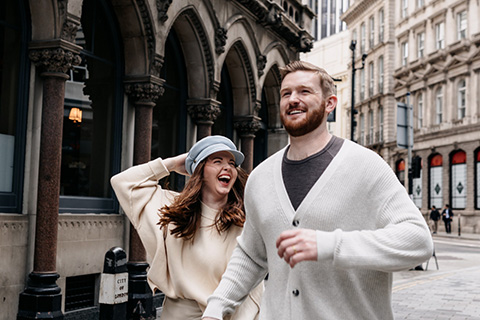
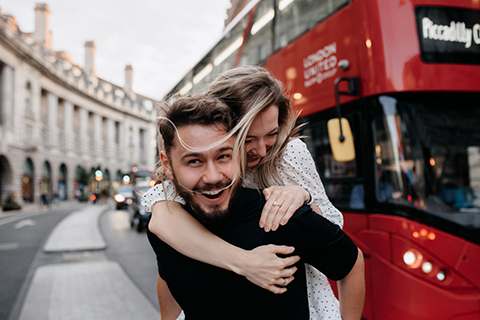
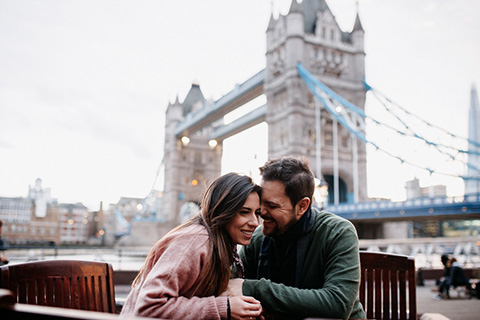
I collect a handful of reference images, usually six to nine. More than that and the direction gets muddy. Some come from the client, some from me, and I keep a personal library of references I reuse across shoots (golden-hour couples, city-street candids, that kind of thing). The point isn't to copy. It's to agree on light, mood, poses and colour before we meet, so there are no surprises.
The location notes
Anything I'd otherwise have to remember goes into the shoot's notes: where to park, where the light falls at that time of day, the gate code for a studio, a backup spot if it rains, whether we need a permit. I write these notes for the version of me who's running ten minutes late and needs the answer in two seconds.
The client brief
Finally, I send the client a short brief: date, time, meeting point, duration, what to wear, what's been paid and what's left, and the moodboard. It sets expectations and it makes me look organised, because I am. In Shotio I export this as a PDF client brief straight from the shoot. For more involved jobs I also make an internal call sheet with the gear list and my private notes that the client doesn't need to see.
4. Pack from a gear list, not from memory
Forgetting gear is rarely about the camera. It's the small stuff: the spare battery, the formatted card, the reflector, the lens cloth. So I keep a master list of my equipment and assign the pieces I need to each shoot.
A few items (my main body, my go-to lens, batteries, cards) go to every single shoot, so they're added automatically. The rest I pick per job: the 85mm for a portrait session, the flash for an evening event, the reflector for harsh midday sun. The night before, I pack with the list open and tick things off physically as they go in the bag.
My night-before routine:
- Charge every battery, including the flash and the phone
- Offload and format memory cards (only after the previous shoot is backed up twice)
- Clean the lenses and sensor if needed
- Pack against the shoot's gear list, not against habit
- Check the weather and the sunset time for outdoor sessions
5. The 24 hours before the shoot
I get a reminder 24 hours before every confirmed shoot. It's my cue to run through a short pre-shoot check:
- Re-read the notes and moodboard so the plan is fresh
- Send the client a quick confirmation with the time and meeting point
- Plan travel time, with a buffer for traffic and parking
- Check the weather once more and agree a backup if needed
This takes ten minutes, and it's the reason my shoots start calm instead of rushed. Clients notice.
6. On the day
I arrive 15 minutes early to check the light and walk the location. Because everything is in one place on my phone (address, notes, moodboard, gear list, what's been paid) I'm not scrolling through messages while the client is standing in front of me.
If anything comes up during the session, like a pose the client loved, a print they asked about or an extra location we added, I add it to the shoot's notes before I drive away. Future me will forget otherwise.
7. Editing, deadlines and delivery
As soon as the shoot is done it moves to Editing. Every shoot gets a delivery deadline. Mine defaults to 14 days after the session, and I adjust it for bigger jobs. I tell the client that date up front, and I get an alert the day before it's due.
Having a status for every shoot means I can see my editing queue at a glance: what's still pending, what's confirmed, what I'm editing and what's delivered. When the gallery goes out and the balance is paid, the shoot moves to Delivered, and that's the job closed.
The workflow in four statuses: Pending → Confirmed → Editing → Delivered. Simple enough to stick to on a busy week, which is the whole point.
8. Review the numbers every month
Once a month I look back. Not at likes, at the business: how many shoots I completed, how much I was actually paid (not quoted), my average per shoot, and which session lengths I'm booking most.
That last one is surprisingly useful. If most of my bookings are one-hour sessions but my pricing is built around two hours, that's a sign to rethink my packages. Comparing month to month also shows me the quiet seasons early enough to plan promotions around them. I use the analytics in Shotio for this, but even a simple spreadsheet works if you log payments consistently.
My complete photoshoot checklist
Here's the whole system on one page. Copy it, adapt it, make it yours.
| Stage | What I do | Status |
|---|---|---|
| Booking | Create the shoot: client, date, time, duration, location, price, session type. Check for overlaps. | Pending |
| Deposit | Log the deposit with its date. Confirm the date with the client. | Confirmed |
| 1–2 weeks before | Build the moodboard, write location notes, send the client brief. | Confirmed |
| Night before | Charge, format, clean, pack against the gear list. Check the weather. | Confirmed |
| 24 hours before | Re-read notes, confirm with the client, plan travel. | Confirmed |
| Shoot day | Arrive early, shoot, add any new notes before leaving. | Confirmed |
| After the shoot | Back up twice, set the delivery deadline, start editing. | Editing |
| Delivery | Send the gallery, log the final payment. | Delivered |
| Monthly | Review completed shoots, income, average per shoot and session lengths. | n/a |
Frequently asked questions
How far in advance should you plan a photoshoot?
For most portrait, couple and family sessions, two to four weeks gives you time to agree a brief, build a moodboard, scout the location and take a deposit. Weddings and commercial shoots usually need months. Whatever the lead time, the planning steps are the same; they just get compressed for last-minute bookings.
What should a photoshoot brief include?
Date, start time and duration, the exact location and meeting point, what the session is for, the agreed price and what has been paid, a short moodboard of reference images, and practical notes such as outfits, parking or access codes.
How do photographers avoid double booking?
Keep every shoot in one calendar with its full duration and travel buffer, not just the start time, and check for overlaps before confirming a booking. A planner that warns you when two sessions overlap removes most of the risk.
How long should photo delivery take?
There is no single rule, but setting a delivery deadline for every shoot and telling the client up front matters more than the exact number. I default to 14 days for portrait and couple sessions and adjust it per job.
The tool I use
You can run this whole system with a calendar, a notes app and a spreadsheet. I did for years. But keeping them in sync was the part that kept breaking, so I built Shotio, a photoshoot planner where each shoot holds its schedule, payments, notes, moodboard and gear list, with reminders, delivery deadlines and monthly analytics built in. It's free to start, and the Pro plan adds unlimited shoots and PDF briefs.